This week, Wednesday 24 March 2010 at 13:30 to be precise, opening mail messages in Thunderbird started to take an age. I say an age but in seconds it was about 7 each time, which in computing terms is aeons, and in human terms is pretty slow for an email.
Given that I get 900+ emails a week that's at least one hour and forty five minutes of work time I would spend waiting for emails to open. Ok I make extensive use of filters, not all mail needs to be read, and with some mail I only need to know the mail has been sent and have a quick scan of the subject to see whether an error has occurred. But even so there are still plenty of mails that need a cursory glance at the contents before they are sent to dev null, the bit bucket, etc. - insert your favourite euphemism for the content-crematorium (data-cremator?) here.
I exhausted good old Google pretty quickly and ended up chewing the fat with a few colleagues, this went off topic on to Microsoft conspiracy theories that would have stretched to breaking the credulity of someone with a rubber credulity gland galvanised by Mr Dunlop himself. I made my excuses and left, although it's a positive thing in the IT world to have some sort of face to face interaction with colleagues, open, honest and frank discussions without a digital interface, there is always the danger of catching a cold.
Back to the matter, a few head scratches later I remembered that other bane of our lives, the virus scanner. Disabling a few components of the interactive scan brought things back to life. The issue had been clouded by an upgrade of Thunderbird from 3.0.2 to 3.0.3 at around the same time the problem appeared, I'd rolled back to older versions which made no difference, faffed about with profiles, gone through the entire Mozillazine troubleshooting process.
Details:
McAfee Virusscan 8.7.0i with sp2.
Mozilla Thunderbird 3.0.3 and earlier versions.
Disable the "Access Protection" task under VirusScan Console, message opening time becomes a more acceptable one second or so.
The moral of this story:
Don't forget to point the finger of blame at your daily-updating, anti-virus software, probably written by programmers not quite good enough to get a job as a games designer (is that a little harsh?).
Apologies, this has been so terribly, terribly dull, I'll get back to my G&T.
Friday, 26 March 2010

Friday, 26 February 2010
Windows 7 with Netware
Further to the install niggles mentioned in the previous post.
If you are in an environment using the Novell Netware implementation of Cifs to attach to filestore (not using the Novell Client but connecting to a Novell Netware server) you will need to change your session settings otherwise you won't be able to connect to the server:
Start | Control Panel | Administrative Tools | Local Security Policy | Local Policies | Security Options | Network security: LAN Manager authentication level
Ensure you select:
"send LM & NTLM - use NTLMv2 session security if negotiated"
If you are in an environment using the Novell Netware implementation of Cifs to attach to filestore (not using the Novell Client but connecting to a Novell Netware server) you will need to change your session settings otherwise you won't be able to connect to the server:
Start | Control Panel | Administrative Tools | Local Security Policy | Local Policies | Security Options | Network security: LAN Manager authentication level
Ensure you select:
"send LM & NTLM - use NTLMv2 session security if negotiated"
Windows 7, first installs
Having a new PC at work prompted me to change my Operating System from XP to Windows 7. The need to run a variety of applications that are unsupported under Linux or the Mac makes the decision that it should be a Windows OS.
These are a few of the niggles I've had so far, and their solutions, your mileage may vary.
Installing the VMware Virtual Infrastructure Client
Running a VMware infrastructure environment means the VI Client has to be installed. Connecting to an ESX server and downloading the 2.5 version of the client presents no problems. However, the vSphere client, version 4, requires a couple of other steps.
Connecting to a vSphere Virtual Centre server prompts the user to run the installer to upgrade the VI Client. If you don't already have Microsoft Visual J# 2.0 Second Edition installed (or if one is installed and it isn't up to date) the installer will return the error:
The Microsoft Visual J# 2.0 Second Edition installer returned the error code '4113'.
Download the working version from the Microsoft website, if you haven't already uninstalled the previous version it should prompt to uninstall and open the appropriate 'remove software' window. Once this is installed run the VI Client again, the installer should then run again but successfully.
Moving Thunderbird settings and mail.
Install Thunderbird on Windows 7, don't bother starting it up or configuring anything. Shut down Thunderbird on your XP machine.
On your XP machine copy the Thunderbird directory from:
C:\Documents and Settings\YourUserName\Application Data\
To this location on your Windows & machine:
C:\Documents and Settings\YourUserName\AppData\Roaming
Start Thunderbird, there may be a compatibility check as it starts up. I found everything to be intact, even though I'd gone a bit mad with filtering and have about 130 filters set up.
Windows 7 has changed the location of Profile elements so it isn't immediately obvious that the Thunderbird profile location has changed as some of the Profile structure is retained in the same path as that of XP...
Installing VMware Server
I find it useful to be able to run up a variety of Virtual Machines with different OS's within my PC.
I found that accessing a Virtual Machine using the web client caused this error to appear, no matter which browser I used:
"The attempt to acquire a valid session ticket for "your machine name" took longer than expected. If this problem persists contact your administrator.":
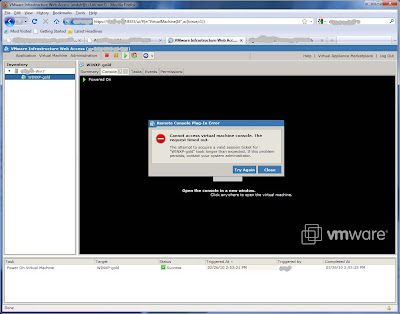
The work around is to use the VI Client to access your VM's as installed earlier, you will occasionally still need to access the web client but the VI Client is much superior. Start the VI Client with the hostname:
HTTPS://localhost:8333
Use your local machine username and password to access it.
These are a few of the niggles I've had so far, and their solutions, your mileage may vary.
Installing the VMware Virtual Infrastructure Client
Running a VMware infrastructure environment means the VI Client has to be installed. Connecting to an ESX server and downloading the 2.5 version of the client presents no problems. However, the vSphere client, version 4, requires a couple of other steps.
Connecting to a vSphere Virtual Centre server prompts the user to run the installer to upgrade the VI Client. If you don't already have Microsoft Visual J# 2.0 Second Edition installed (or if one is installed and it isn't up to date) the installer will return the error:
The Microsoft Visual J# 2.0 Second Edition installer returned the error code '4113'.
Download the working version from the Microsoft website, if you haven't already uninstalled the previous version it should prompt to uninstall and open the appropriate 'remove software' window. Once this is installed run the VI Client again, the installer should then run again but successfully.
Moving Thunderbird settings and mail.
Install Thunderbird on Windows 7, don't bother starting it up or configuring anything. Shut down Thunderbird on your XP machine.
On your XP machine copy the Thunderbird directory from:
C:\Documents and Settings\YourUserName\Application Data\
To this location on your Windows & machine:
C:\Documents and Settings\YourUserName\AppData\Roaming
Start Thunderbird, there may be a compatibility check as it starts up. I found everything to be intact, even though I'd gone a bit mad with filtering and have about 130 filters set up.
Windows 7 has changed the location of Profile elements so it isn't immediately obvious that the Thunderbird profile location has changed as some of the Profile structure is retained in the same path as that of XP...
Installing VMware Server
I find it useful to be able to run up a variety of Virtual Machines with different OS's within my PC.
I found that accessing a Virtual Machine using the web client caused this error to appear, no matter which browser I used:
"The attempt to acquire a valid session ticket for "your machine name" took longer than expected. If this problem persists contact your administrator.":

The work around is to use the VI Client to access your VM's as installed earlier, you will occasionally still need to access the web client but the VI Client is much superior. Start the VI Client with the hostname:
HTTPS://localhost:8333
Use your local machine username and password to access it.
Tuesday, 7 July 2009
"I vant to be alone" Cheese on toast
This'll clear out the tubes, it's a possible hangover tonic, potential swine flu preventative, uncertain cure for black death and an underarm deoderant to repel snakes.
Required ingredients:
Mature Cheddar cheese
1 Onion
English Mustard
1 large garlic clove per slice of bread
Bread, unsliced wholemeal
On no account ever use an ingredient labelled 'mild' unless it is a beer, and you like that sort of thing.
I go for two slices of bread. Cut using a bread knife, if you are feeling a bit 'under the weather' then be careful with that part, no point in losing a finger or two, and don't used sliced white bread for goodness sake!
Toast your slices on one side, turn over and apply thin layer of English mustard to each. Place your not too thinly sliced onion on top, break the onion slices in to rings first. Put your mature Cheddar cheese on top of the onion, either slab slices or grated. Pop back under the grill.
When the cheese is over midway through cooking, partially to well melted on top, crush a large garlic clove on to each slice. That's a clove per slice of bread. You can use more if you really want to be alone for a while longer. If using a garlic crusher make sure the last of the stuff stuck in the crusher goes on top of the cheese too.
Put back under the grill and cook for a short while, don't cook too long or the garlic will become bitter, longer and it will burn.
Eat it. You should also have a large cup of tea as well. Best make a pot.
I don't get hangovers, I obviously don't drink enough, but this works for me, I've never had Lassa fever, Bilharzia or Beriberi, I'm not sure it is down this revitalising snack, but you never know.
Stink the unstinkable "because the answer is often behind you, behind you, behind you", and in a few hours...
Required ingredients:
Mature Cheddar cheese
1 Onion
English Mustard
1 large garlic clove per slice of bread
Bread, unsliced wholemeal
On no account ever use an ingredient labelled 'mild' unless it is a beer, and you like that sort of thing.
I go for two slices of bread. Cut using a bread knife, if you are feeling a bit 'under the weather' then be careful with that part, no point in losing a finger or two, and don't used sliced white bread for goodness sake!
Toast your slices on one side, turn over and apply thin layer of English mustard to each. Place your not too thinly sliced onion on top, break the onion slices in to rings first. Put your mature Cheddar cheese on top of the onion, either slab slices or grated. Pop back under the grill.
When the cheese is over midway through cooking, partially to well melted on top, crush a large garlic clove on to each slice. That's a clove per slice of bread. You can use more if you really want to be alone for a while longer. If using a garlic crusher make sure the last of the stuff stuck in the crusher goes on top of the cheese too.
Put back under the grill and cook for a short while, don't cook too long or the garlic will become bitter, longer and it will burn.
Eat it. You should also have a large cup of tea as well. Best make a pot.
I don't get hangovers, I obviously don't drink enough, but this works for me, I've never had Lassa fever, Bilharzia or Beriberi, I'm not sure it is down this revitalising snack, but you never know.
Stink the unstinkable "because the answer is often behind you, behind you, behind you", and in a few hours...
Monday, 6 July 2009
Twit-tastic
A few Twitter moments of the past week.
Doing an early upgrade one morning and tweeting generally about the task in hand, I mentioned iSCSI timeouts, and within the blink of an eye @scevans in California replied to me regarding iSCSI. If i'd been having trouble there would have been a sounding board on hand, as it was we had a chat about the iSCSI implementation on a couple of OS's.
Looking for information on the Gartner website regarding outsourcing I was disappointed to find the latest blog directly referring to the subject was from 2004. I made a minor grumble about this. In an instant @jeffman from Gartner was on the case protecting his company's reputation, he found a few links for me and explained that the Blogs are now organised under analyst rather than topic. Personally I would find an index of topics to be more useful, nevertheless, this is good, on-the-ball stuff, and is/was very helpful.
While browsing the Triumph Motorcycles website I was getting miffed by the number of flash and fancy graphic related failures and broken links. I had a minor grumble about this (honestly I'm not a grumbler but this sounds like a theme developing!) Quick as a flash Mr Beelzebub himself responded (@beezly) to tell me how much he liked the website and that it worked for him, I know this is just a ploy on his part and that he is after a discount from Mr Triumph, fanbois huh!
Even with a signal to noise ratio as low as mine (I can often be the person that put the twit in Twitter) there are plenty of good moments when following (not in a religious sense) a diverse pool of people.
Doing an early upgrade one morning and tweeting generally about the task in hand, I mentioned iSCSI timeouts, and within the blink of an eye @scevans in California replied to me regarding iSCSI. If i'd been having trouble there would have been a sounding board on hand, as it was we had a chat about the iSCSI implementation on a couple of OS's.
Looking for information on the Gartner website regarding outsourcing I was disappointed to find the latest blog directly referring to the subject was from 2004. I made a minor grumble about this. In an instant @jeffman from Gartner was on the case protecting his company's reputation, he found a few links for me and explained that the Blogs are now organised under analyst rather than topic. Personally I would find an index of topics to be more useful, nevertheless, this is good, on-the-ball stuff, and is/was very helpful.
While browsing the Triumph Motorcycles website I was getting miffed by the number of flash and fancy graphic related failures and broken links. I had a minor grumble about this (honestly I'm not a grumbler but this sounds like a theme developing!) Quick as a flash Mr Beelzebub himself responded (@beezly) to tell me how much he liked the website and that it worked for him, I know this is just a ploy on his part and that he is after a discount from Mr Triumph, fanbois huh!
Even with a signal to noise ratio as low as mine (I can often be the person that put the twit in Twitter) there are plenty of good moments when following (not in a religious sense) a diverse pool of people.
Saturday, 27 June 2009
Basic curry in a hurry - Parsnip, prince of roots
Serves two people.
Ingredients:
vegetable oil
3 medium sized onions.
5 parsnips, not the largest, just under medium sized.
2 chillies, a green one and a red one
ground cumin
ground coriander
turmeric
6 medium sized cloves of garlic.
dried chillies
tomato puree
black pepper
1 tin of chopped tomatoes
1 tin of chick peas in water unsalted
red lentils
1 teaspoon of sugar
A big pan
A big wooden spoon
Some rice
Another big pan
Method:
This will take about an hour.
18:17 (0 minutes)
Put your oil in a large pan on a low heat, enough oil to almost completely cover the onions you are shortly going to put in the pan.
Chop your onion. Chuck a bit of onion in to check whether the oil is hot enough yet, a gentle sizzle should do it. If hot enough put all of your onion in and turn up the heat slightly and cook the onions slowly. Scrub, brush, top and tail, or do whatever you do to parsnips before cooking, then cut them in half so you have a short stubby bit and a thin bit of parsnip. Split the parsnip halves in two along their lengths, if cooking for a longer time than here don't bother cutting in half but just split the parsnips along their length.
The onions should be on their way to being translucent now, add the parsnips and stir around making sure they are covered in oil. I fed the cats at this moment so leave cooking for however long that took, a couple of minutes perhaps. Chop your chillies and add them.
18:30 (13 minutes)
Crush and add the cloves of garlic, give it a good stir, I listened to The Now Show at this point, add cumin, coriander, turmeric and dried chillies, this probably worked out at a couple of rounded teaspoons of each apart from the chillies which were level teaspoons, stir it up. These were the only spices in the cupboard, fenugreek, cardamom and ginger would have been good additions.
After a couple of minutes add about two tablespoons of tomato puree, give it a good stir, grind in some black pepper. Let this cook for a couple more minutes and then add the tin of chopped tomatoes, stir in then add the tin of chick peas including the water. Turn up the heat slightly, give a good stir.
18:36 (19 minutes)
Add two handfuls of red lentils. Keep it on a slow simmer while stiring occasionally to prevent stickage. There about 40 minutes cooking time left.
18:43 (26 minutes)
Cook some rice. Marcus Brigstocke having a bit of a rant about political apathy. Put a pan of water on the heat, lots of water as the rice should be able to move freely while cooking. When the water is just about to boil put your rice in, I used Basmati rice, enough for two people. One stir with a wooden spoon should be enough to stop the rice sticking, don't boil the water but keep it simmering. After about 6 or 7 minutes retrieve some rice on your spoon and check for consistency, to bite it should still be reasonably firm in the middle but soft externally. Take it off the heat and run cold water through to stop the rice cooking, this also rinses the rice. Once cold, drain but leave the rice in the pan for later.
The rice will have a kettle of boiling water poured on it later to heat it through before serving, this reduces the possibility of a last minute flap and potentially overcooking the rice.
19:05 (48 minutes)
About 5 to 10 minutes before serving add half a teaspoon of coriander, of cumin and a teaspoon of sugar. If you have Garam Masala add that instead of the cumin and coriander
19:10 (53 minutes)
Get the kettle on for the rice, once boiled pour the water on the rice and leave for about 2 minutes.
Get the plates and cutlery ready.
Get the mango chutney out.
19:15 (58 minutes)
Serve it up. I didn't add any salt, you may wish too. The parsnips should have absorbed the flavours, the longer the cooking period the better the parnips will taste, there is no need to hurry this.
All vegetable offcuts were put aside for the compost, 'stir it up' references, copyright Bob Marley.
Ingredients:
vegetable oil
3 medium sized onions.
5 parsnips, not the largest, just under medium sized.
2 chillies, a green one and a red one
ground cumin
ground coriander
turmeric
6 medium sized cloves of garlic.
dried chillies
tomato puree
black pepper
1 tin of chopped tomatoes
1 tin of chick peas in water unsalted
red lentils
1 teaspoon of sugar
A big pan
A big wooden spoon
Some rice
Another big pan
Method:
This will take about an hour.
18:17 (0 minutes)
Put your oil in a large pan on a low heat, enough oil to almost completely cover the onions you are shortly going to put in the pan.
Chop your onion. Chuck a bit of onion in to check whether the oil is hot enough yet, a gentle sizzle should do it. If hot enough put all of your onion in and turn up the heat slightly and cook the onions slowly. Scrub, brush, top and tail, or do whatever you do to parsnips before cooking, then cut them in half so you have a short stubby bit and a thin bit of parsnip. Split the parsnip halves in two along their lengths, if cooking for a longer time than here don't bother cutting in half but just split the parsnips along their length.
The onions should be on their way to being translucent now, add the parsnips and stir around making sure they are covered in oil. I fed the cats at this moment so leave cooking for however long that took, a couple of minutes perhaps. Chop your chillies and add them.
18:30 (13 minutes)
Crush and add the cloves of garlic, give it a good stir, I listened to The Now Show at this point, add cumin, coriander, turmeric and dried chillies, this probably worked out at a couple of rounded teaspoons of each apart from the chillies which were level teaspoons, stir it up. These were the only spices in the cupboard, fenugreek, cardamom and ginger would have been good additions.
After a couple of minutes add about two tablespoons of tomato puree, give it a good stir, grind in some black pepper. Let this cook for a couple more minutes and then add the tin of chopped tomatoes, stir in then add the tin of chick peas including the water. Turn up the heat slightly, give a good stir.
18:36 (19 minutes)
Add two handfuls of red lentils. Keep it on a slow simmer while stiring occasionally to prevent stickage. There about 40 minutes cooking time left.
18:43 (26 minutes)
Cook some rice. Marcus Brigstocke having a bit of a rant about political apathy. Put a pan of water on the heat, lots of water as the rice should be able to move freely while cooking. When the water is just about to boil put your rice in, I used Basmati rice, enough for two people. One stir with a wooden spoon should be enough to stop the rice sticking, don't boil the water but keep it simmering. After about 6 or 7 minutes retrieve some rice on your spoon and check for consistency, to bite it should still be reasonably firm in the middle but soft externally. Take it off the heat and run cold water through to stop the rice cooking, this also rinses the rice. Once cold, drain but leave the rice in the pan for later.
The rice will have a kettle of boiling water poured on it later to heat it through before serving, this reduces the possibility of a last minute flap and potentially overcooking the rice.
19:05 (48 minutes)
About 5 to 10 minutes before serving add half a teaspoon of coriander, of cumin and a teaspoon of sugar. If you have Garam Masala add that instead of the cumin and coriander
19:10 (53 minutes)
Get the kettle on for the rice, once boiled pour the water on the rice and leave for about 2 minutes.
Get the plates and cutlery ready.
Get the mango chutney out.
19:15 (58 minutes)
Serve it up. I didn't add any salt, you may wish too. The parsnips should have absorbed the flavours, the longer the cooking period the better the parnips will taste, there is no need to hurry this.
All vegetable offcuts were put aside for the compost, 'stir it up' references, copyright Bob Marley.
Thursday, 18 June 2009
Cloud Computing and the Virtualised Datacentre
VMware event at Old Trafford Theater of Dreams (TM)
Piled over to Manchester from Sheffield on the train to attend a day of sessions on Cloud Computing and the Virtualised Datacentre. I expected we would get the tram to the ground but major maintenance work was being carried out on the tram infrastrucutre in the city centre - they have a replacement bus service on to St Peter's Square but it is as quick to walk. This added a little delay, as well as mysterious stops every minute or so along route, taking lessons from the tube I expect!
We missed the first few minutes of the keynote speech but it was general background stuff, there were lots of references to computing in the cloud, internal and external clouds.
Three sessions were to run simultaneously during each session block, we split up and took a session each. Not all sessions were repeated through the day.
The first session I attended was on storage, this focussed on EMC and how they were ahead of other storage vendors in tying in to the new vStorage API framework available for vendoirs to hook in to vSphere. No surprise really that as EMC own VMware, but Netapp and other vendors either already have or will be working on those areas too. The EMC capabilities will be typical of the sort of stuff coming - Netapp already have have rapid cloning and other functionality that is triggered from the VI Client using the new API. Thin provisioning from the VMware side (not required if you are already doing it at the storage side), sVmotion that can be done within the storage array rather than via an ESX host, recovering VMs from native storage snapshots (rather than VM snaps) from
within the VI CLient, storage tiering, where storage can be moved from expensive disk to less expensive disk, nice stuff like that.
The second session attended was a very good one from Cisco. Lots of interesting stuff albeit with a cheesy video about the infrastructure 'tribes', the Networking, Storage, and Server tribes and how as virtualisation encompasses all these areas there is now a fourth tribe, and the potential for disharmony - I don't think we've had any of that but as I occupy three of those roles I'm not about to own up to disagreeing with myself;-)
Much was said about putting the network team back in control of the networking, right down to the virtual switch in ESX - something that has been the department of the Virtual Environment admin until now. This is a good thing, there should be a consistency in how switches are managed even when virtual. New technology (vNetwork in VMware which is built on by Cisco soft/hardware) allows a distributed vSwitch to be created, this means port/machine policies, statistics, rules and the like follow the virtual machine when the machine is migrated. There are other ways of picking up some of these statistics by monitoring each VM directly, something we do now, but the fine level of control normally available to Network Admins has been missing. An example of one of these levels of control is security. Currently all VMs attached to the same vSwitches can communicate with each other unhindered as when talking to each other over the same vSwitch traffic is never sent out to the managed LAN, in many environments this is not desirable and there may be requirements that machines are walled off in various ways.
The VMware environment needs to be running at least Enterprise Plus to be able to use this new technology. There is a Cisco Virtual Supervisor Module (VSM) that exists as a VM that controls the DistributedvSwitch. The Nexus 1000v is the Cusco hardware that sits out in a rack provides ports that create an extended ethernet in to the virtual environment, as physical hosts are added to the virtual environment they automatically pick up the distributed vSwitch configuration.
Piled over to Manchester from Sheffield on the train to attend a day of sessions on Cloud Computing and the Virtualised Datacentre. I expected we would get the tram to the ground but major maintenance work was being carried out on the tram infrastrucutre in the city centre - they have a replacement bus service on to St Peter's Square but it is as quick to walk. This added a little delay, as well as mysterious stops every minute or so along route, taking lessons from the tube I expect!
We missed the first few minutes of the keynote speech but it was general background stuff, there were lots of references to computing in the cloud, internal and external clouds.
Three sessions were to run simultaneously during each session block, we split up and took a session each. Not all sessions were repeated through the day.
The first session I attended was on storage, this focussed on EMC and how they were ahead of other storage vendors in tying in to the new vStorage API framework available for vendoirs to hook in to vSphere. No surprise really that as EMC own VMware, but Netapp and other vendors either already have or will be working on those areas too. The EMC capabilities will be typical of the sort of stuff coming - Netapp already have have rapid cloning and other functionality that is triggered from the VI Client using the new API. Thin provisioning from the VMware side (not required if you are already doing it at the storage side), sVmotion that can be done within the storage array rather than via an ESX host, recovering VMs from native storage snapshots (rather than VM snaps) from
within the VI CLient, storage tiering, where storage can be moved from expensive disk to less expensive disk, nice stuff like that.
The second session attended was a very good one from Cisco. Lots of interesting stuff albeit with a cheesy video about the infrastructure 'tribes', the Networking, Storage, and Server tribes and how as virtualisation encompasses all these areas there is now a fourth tribe, and the potential for disharmony - I don't think we've had any of that but as I occupy three of those roles I'm not about to own up to disagreeing with myself;-)
Much was said about putting the network team back in control of the networking, right down to the virtual switch in ESX - something that has been the department of the Virtual Environment admin until now. This is a good thing, there should be a consistency in how switches are managed even when virtual. New technology (vNetwork in VMware which is built on by Cisco soft/hardware) allows a distributed vSwitch to be created, this means port/machine policies, statistics, rules and the like follow the virtual machine when the machine is migrated. There are other ways of picking up some of these statistics by monitoring each VM directly, something we do now, but the fine level of control normally available to Network Admins has been missing. An example of one of these levels of control is security. Currently all VMs attached to the same vSwitches can communicate with each other unhindered as when talking to each other over the same vSwitch traffic is never sent out to the managed LAN, in many environments this is not desirable and there may be requirements that machines are walled off in various ways.
The VMware environment needs to be running at least Enterprise Plus to be able to use this new technology. There is a Cisco Virtual Supervisor Module (VSM) that exists as a VM that controls the DistributedvSwitch. The Nexus 1000v is the Cusco hardware that sits out in a rack provides ports that create an extended ethernet in to the virtual environment, as physical hosts are added to the virtual environment they automatically pick up the distributed vSwitch configuration.
Subscribe to:
Posts (Atom)

