Brushes off some blog dust. Coughs. Carries on.
Turned on a radio this morning that had been left tuned to local radio. It could equally have been T'Pau with China in your Hand or one of the thousands of versions of Wind Beneath My Wings, but on this occasion they were playing Chicago with If You Leave Me Now.
Right, I thought, here's a pointless study I could do. Given the constraints of the breakfast show play-list on local radio how long will it be before the same songs start coming round again, and indeed how long before it's China in your Hand or Wind Beneath my Wings.
I'm well placed to make such a judgement about how bland this music is as I'm an international superstar, I've played Worksop, twice, put that in your pipe so called Mick Jagger. Ah, just had word from my legal team and apparently he is called Mick Jagger, fancy that.
Anyway, until I forget to do this, here's number 1:
Day1
6.40AM
LocalRadio
BlandSong
Chicago - If You Leave Me Now
Monday, 27 September 2010

Sunday, 2 May 2010
Graffiti art 2
It appears that a day after my previous graffiti blog last Sunday that a nascent Mondrian, in the early stages of development as an abstract artist, has overwritten graffiti on the same wall. And in a hat-tipping reference to the self referential nature of the previous graffiti they have written 'wet paint' on the pavement. Clever stuff.
Clearly it wasn't an effort to make the wall look better as they didn't paint over the peeling or dirty areas. Perhaps this is a reference to the nature of art, art highlighting the difference between our context of reality and that of the perfection of geometric designs, a juxtaposition directly related by its appearance on the imperfect façade.
 Although it would have been better if they'd used a decent straight-edge.
Monday, 26 April 2010
The Amazon Kindle
Some pictures of the Amazon Kindle.

Electronic ink, very easy and pleasant to read. Being used to touch screens meant repeatedly trying to select and scroll through the pages with futile finger-sliding attempts.

The keys are hard to press cleanly, navigation through and selection of the text feels odd using the joystick.
There's a cumbersome multi-step process to retrieve annotations to save elsewhere as it isn't possible to pull them directly from the device, and annotations will be lost if Amazon wipes-out your book collection. There's a limit to the amount of annotation (Amazon calls them clippings) available on some books controlled by DRM, it's not possible to check what this limit is other than by hitting it.
It's thinner than I expected at about a centimetre, and it looks better than the advertising and review pictures portray it.
It needs a wave of the Apple design-team magic-wand but a viable alternative to carrying a bookcase with you on to a train.

Electronic ink, very easy and pleasant to read. Being used to touch screens meant repeatedly trying to select and scroll through the pages with futile finger-sliding attempts.

The keys are hard to press cleanly, navigation through and selection of the text feels odd using the joystick.
 |  |
There's a cumbersome multi-step process to retrieve annotations to save elsewhere as it isn't possible to pull them directly from the device, and annotations will be lost if Amazon wipes-out your book collection. There's a limit to the amount of annotation (Amazon calls them clippings) available on some books controlled by DRM, it's not possible to check what this limit is other than by hitting it.
 |  |
It's thinner than I expected at about a centimetre, and it looks better than the advertising and review pictures portray it.
 |  |
It needs a wave of the Apple design-team magic-wand but a viable alternative to carrying a bookcase with you on to a train.
Sunday, 25 April 2010
Graffiti art
I keep walking past this giant chap on the way to work, it took some time to work its way through my early-morning lack of consciousness but eventually, over this last week, it sunk in enough for me to take a photo.
It looks too neatly structured to be a free-form spray work, not sure if stencil or masking was used. Is the text to the left to do with the picture, it looks too amateurish, like the tag behind his backside? But the text has been written by the chap himself, the paint brush in his hand answers the question, although the tag would still be by someone else. Above the tag there is what looks like a signature in the more stylised form of the picture itself. It's on this wall on a main road.

Here's another one that's around the University campus, this appears to be a stencil although the spectacle frame over the right eye might suggest otherwise.

I don't think these examples are detrimental to the environment, I'll keep a look out for others, if I'm awake.
Friday, 26 March 2010
Thunderbird, and another thing my old fruit
This week, Wednesday 24 March 2010 at 13:30 to be precise, opening mail messages in Thunderbird started to take an age. I say an age but in seconds it was about 7 each time, which in computing terms is aeons, and in human terms is pretty slow for an email.
Given that I get 900+ emails a week that's at least one hour and forty five minutes of work time I would spend waiting for emails to open. Ok I make extensive use of filters, not all mail needs to be read, and with some mail I only need to know the mail has been sent and have a quick scan of the subject to see whether an error has occurred. But even so there are still plenty of mails that need a cursory glance at the contents before they are sent to dev null, the bit bucket, etc. - insert your favourite euphemism for the content-crematorium (data-cremator?) here.
I exhausted good old Google pretty quickly and ended up chewing the fat with a few colleagues, this went off topic on to Microsoft conspiracy theories that would have stretched to breaking the credulity of someone with a rubber credulity gland galvanised by Mr Dunlop himself. I made my excuses and left, although it's a positive thing in the IT world to have some sort of face to face interaction with colleagues, open, honest and frank discussions without a digital interface, there is always the danger of catching a cold.
Back to the matter, a few head scratches later I remembered that other bane of our lives, the virus scanner. Disabling a few components of the interactive scan brought things back to life. The issue had been clouded by an upgrade of Thunderbird from 3.0.2 to 3.0.3 at around the same time the problem appeared, I'd rolled back to older versions which made no difference, faffed about with profiles, gone through the entire Mozillazine troubleshooting process.
Details:
McAfee Virusscan 8.7.0i with sp2.
Mozilla Thunderbird 3.0.3 and earlier versions.
Disable the "Access Protection" task under VirusScan Console, message opening time becomes a more acceptable one second or so.
The moral of this story:
Don't forget to point the finger of blame at your daily-updating, anti-virus software, probably written by programmers not quite good enough to get a job as a games designer (is that a little harsh?).
Apologies, this has been so terribly, terribly dull, I'll get back to my G&T.
Friday, 26 February 2010
Windows 7 with Netware
Further to the install niggles mentioned in the previous post.
If you are in an environment using the Novell Netware implementation of Cifs to attach to filestore (not using the Novell Client but connecting to a Novell Netware server) you will need to change your session settings otherwise you won't be able to connect to the server:
Start | Control Panel | Administrative Tools | Local Security Policy | Local Policies | Security Options | Network security: LAN Manager authentication level
Ensure you select:
"send LM & NTLM - use NTLMv2 session security if negotiated"
Windows 7, first installs
Having a new PC at work prompted me to change my Operating System from XP to Windows 7. The need to run a variety of applications that are unsupported under Linux or the Mac makes the decision that it should be a Windows OS.
These are a few of the niggles I've had so far, and their solutions, your mileage may vary.
Installing the VMware Virtual Infrastructure Client
Running a VMware infrastructure environment means the VI Client has to be installed. Connecting to an ESX server and downloading the 2.5 version of the client presents no problems. However, the vSphere client, version 4, requires a couple of other steps.
Connecting to a vSphere Virtual Centre server prompts the user to run the installer to upgrade the VI Client. If you don't already have Microsoft Visual J# 2.0 Second Edition installed (or if one is installed and it isn't up to date) the installer will return the error:
The Microsoft Visual J# 2.0 Second Edition installer returned the error code '4113'.
Download the working version from the Microsoft website, if you haven't already uninstalled the previous version it should prompt to uninstall and open the appropriate 'remove software' window. Once this is installed run the VI Client again, the installer should then run again but successfully.
Moving Thunderbird settings and mail.
Install Thunderbird on Windows 7, don't bother starting it up or configuring anything. Shut down Thunderbird on your XP machine.
On your XP machine copy the Thunderbird directory from:
C:\Documents and Settings\YourUserName\Application Data\
To this location on your Windows & machine:
C:\Documents and Settings\YourUserName\AppData\Roaming
Start Thunderbird, there may be a compatibility check as it starts up. I found everything to be intact, even though I'd gone a bit mad with filtering and have about 130 filters set up.
Windows 7 has changed the location of Profile elements so it isn't immediately obvious that the Thunderbird profile location has changed as some of the Profile structure is retained in the same path as that of XP...
Installing VMware Server
I find it useful to be able to run up a variety of Virtual Machines with different OS's within my PC.
I found that accessing a Virtual Machine using the web client caused this error to appear, no matter which browser I used:
"The attempt to acquire a valid session ticket for "your machine name" took longer than expected. If this problem persists contact your administrator.":
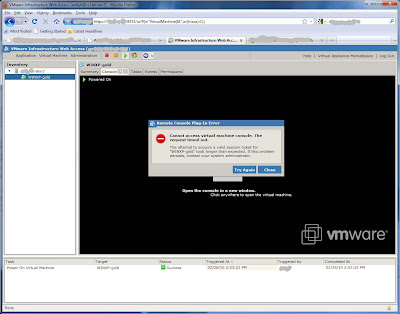
The work around is to use the VI Client to access your VM's as installed earlier, you will occasionally still need to access the web client but the VI Client is much superior. Start the VI Client with the hostname:
HTTPS://localhost:8333
Use your local machine username and password to access it.
These are a few of the niggles I've had so far, and their solutions, your mileage may vary.
Installing the VMware Virtual Infrastructure Client
Running a VMware infrastructure environment means the VI Client has to be installed. Connecting to an ESX server and downloading the 2.5 version of the client presents no problems. However, the vSphere client, version 4, requires a couple of other steps.
Connecting to a vSphere Virtual Centre server prompts the user to run the installer to upgrade the VI Client. If you don't already have Microsoft Visual J# 2.0 Second Edition installed (or if one is installed and it isn't up to date) the installer will return the error:
The Microsoft Visual J# 2.0 Second Edition installer returned the error code '4113'.
Download the working version from the Microsoft website, if you haven't already uninstalled the previous version it should prompt to uninstall and open the appropriate 'remove software' window. Once this is installed run the VI Client again, the installer should then run again but successfully.
Moving Thunderbird settings and mail.
Install Thunderbird on Windows 7, don't bother starting it up or configuring anything. Shut down Thunderbird on your XP machine.
On your XP machine copy the Thunderbird directory from:
C:\Documents and Settings\YourUserName\Application Data\
To this location on your Windows & machine:
C:\Documents and Settings\YourUserName\AppData\Roaming
Start Thunderbird, there may be a compatibility check as it starts up. I found everything to be intact, even though I'd gone a bit mad with filtering and have about 130 filters set up.
Windows 7 has changed the location of Profile elements so it isn't immediately obvious that the Thunderbird profile location has changed as some of the Profile structure is retained in the same path as that of XP...
Installing VMware Server
I find it useful to be able to run up a variety of Virtual Machines with different OS's within my PC.
I found that accessing a Virtual Machine using the web client caused this error to appear, no matter which browser I used:
"The attempt to acquire a valid session ticket for "your machine name" took longer than expected. If this problem persists contact your administrator.":

The work around is to use the VI Client to access your VM's as installed earlier, you will occasionally still need to access the web client but the VI Client is much superior. Start the VI Client with the hostname:
HTTPS://localhost:8333
Use your local machine username and password to access it.
Subscribe to:
Posts (Atom)

